CD + Vinyl Authoring · macOS

One album, out as a CD master and an LP master.

A CD and vinyl premastering application for macOS. Import your masters, sequence the record, set gaps, fades and metadata, and deliver a DDP 2.00 fileset for the plant and a hi-res premaster for the cutting room — from one project.

This is the last touch: the stage after the plugins have done their work, where a record is assembled rather than processed.

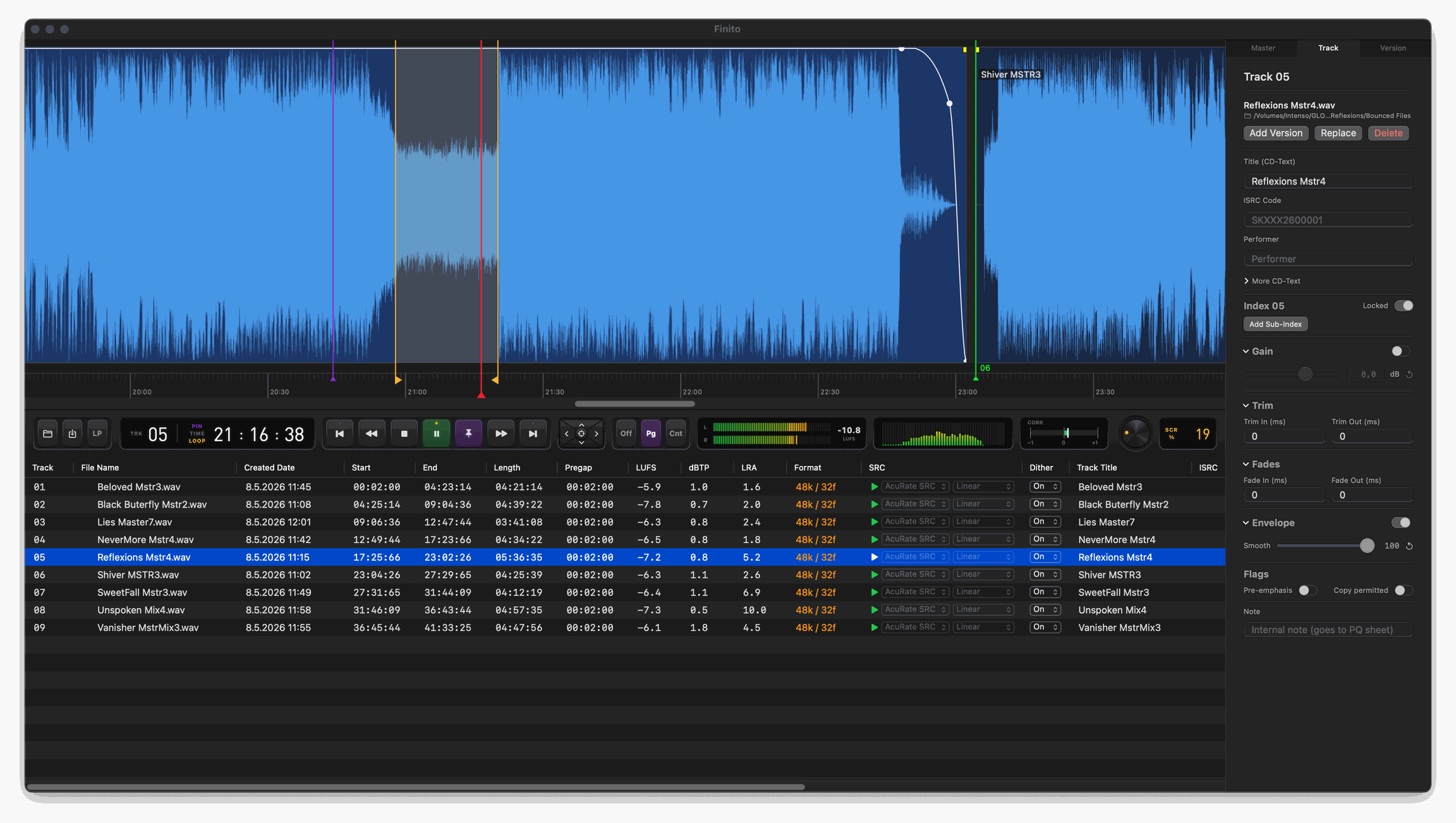
Finito UI
// Workflow

From approved masters to a delivered record

Four stages, one project file.

Importing masters into Finito
// 01 — IMPORT

Bring the material in

Drag in the masters, or import an existing DDP fileset, a CUE image or an audio CD. ISRC and titles are read from BWF, iXML and ID3 where they exist, from CD-Text and the disc's subcode where they don't, with a MusicBrainz lookup for the rest.

Sequencing the album on the Finito timeline
// 02 — SEQUENCE

Assemble and audition

Set the running order, gaps, fades and crossfades on the timeline and hear every transition in context. Loudness per track and for the disc, LUFS, dBTP and LRA in the list, and a movable INDEX 01 when the pregap should be audible.

Client approval copy playing in a browser
// 03 — APPROVAL

Send it for sign-off

Export a client copy that opens in any browser, on a laptop or a phone, and plays the record exactly as sequenced. When another mix comes back, it goes in as a new version of that track — the timeline stays as it was.

Finito export dialog and DDP fileset
// 04 — DELIVER

Hand it over

A DDP 2.00 fileset with MD5 and a reference cue for a check burn, a PQ sheet, a mastering report, and the vinyl sides as a hi-res premaster with their cue sheet. Batch delivery writes the lot into one folder in a single render.

// Deliverables

What leaves the studio

The plant gets a fileset it can cut from. The client gets something they can open.

DDP 2.00 fileset and PQ sheet produced by Finito
// FOR THE PLANT

DDP 2.00, PQ sheet, check burn

DDPID, DDPMS, PQDESCR, CDTEXT.BIN, IMAGE.DAT and checksum.md5, plus a reference cue so the fileset can be burned and checked before it ships. Verify DDP re-reads the folder afterwards: MD5, stream lengths against the actual file sizes, and the CRC of every CD-Text pack.

Finito client preview player and vinyl preview in a browser
// FOR THE CLIENT

An approval copy that just opens

One file that opens in any browser — laptop, tablet, phone — playing the disc as sequenced: order, gaps, fades, transitions. The vinyl version arrives as a side at a time, on a turntable that plays the way the record will. Nothing to install and no format they have never seen.

// Why Finito

A record is never quite as finished as everyone thinks. The mixes are signed off and the master is approved — and then, at authoring, the last real decisions still get made: which version of track four, how the gaps sit, what the trip down to 44.1 does to the top end.

That is the last touch, and the name says what it's for. It is also the moment most tools treat as a formality — a dialog box and a progress bar at exactly the point where a decision still matters. Finito is built for it: the CD and the vinyl in one project, versions you can hear against each other instead of guessing at, and conversion you can change and audition before committing to it.

It is written and supported by one person — a producer and drummer of 30+ years, building the tool he wanted on the desk. That is also why it is a one-time price with no dongle and no subscription: there is no funding round in it that needs paying back.

— Martin Migash, migashaudio

Built for the last touch

Both formats, every version, and conversion you can actually hear.

// CD + VINYL

Two formats, one project

Author a Red Book CD and cut a vinyl premaster from the same session, switching between them with a keystroke. Vinyl mode keeps its own edits, sides and segues, so working on one format never disturbs the other — up to eight sides for a double LP.

// HI-RES OUT

The premaster renders at the source rate

The vinyl premaster renders at the source rate by default — 96, 192 kHz, whatever came in — so the cutting room gets the resolution it was given. Drop the rate only when you mean to, and pick the engine that does it.

// VERSIONS

Every version under one marker

When another mix lands, you don't rebuild the timeline. Hold every version of a track under one fixed marker — Vocal +1 dB, Less Bass, Final — and A/B them live. Each format can even keep a different take, the vinyl playing one while the CD keeps another.

// CONVERSION

Swap SRC engines on the fly

Change the sample-rate conversion per track and hear the difference straight away — five engines, from AcuRate SRC with a −127 dB stopband to bit-exact SoX VHQ, r8brain and SSRC. The character of the conversion is something you choose by ear, not a setting buried in an export dialog.

// PREVIEW

Preview runs the final chain

Playback uses the same conversion and dither code that writes the master, not a cut-down draft to save CPU. It is what makes comparing versions and engines mean anything: the difference you hear is the difference that ships.

// DELIVERY

A complete DDP 2.00 delivery

A complete DDP 2.00 fileset — image, PQ descriptor, CD-Text, MD5 and a reference cue for a check burn — plus ISRC and MCN, per-track dither, sector-clean gaps, and an EBU R128 report so you know the loudness before it ships.

// CLIENT APPROVAL

An approval copy the client can open

The approval copy is a player, not a file the client has to work out. Send it and it opens in any browser — laptop, tablet, phone — playing the disc exactly as sequenced: track order, gaps, fades, transitions, the whole running order. Nothing to download, nothing to install, and no "it won't open on my machine" two days before the deadline.
// Also in the box

The rest of what it does

Import
  • DDP fileset import, round-trip tested
  • CUE + single-image WAV, in and out
  • Audio CD import — track by track or as one disc image
  • ISRC, MCN and CD-Text read from the disc subcode
  • Metadata from BWF, iXML and ID3
  • MusicBrainz lookup for titles and credits
Editing
  • Trim, fades with an adjustable curve, crossfades
  • Gain and envelope automation with smoothing
  • Frame-accurate numeric fields and arrow-key nudge
  • Movable INDEX 01 for audible pregaps
  • Sub-indexes beyond INDEX 01
  • Pre-emphasis and SCMS flags, through the whole chain
Checks
  • Validate Project before export
  • Verify DDP — MD5, stream lengths, CD-Text CRC
  • EBU R128 per track and for the disc
  • Real-time integrated LUFS while you listen
  • De-emphasis monitoring for pre-emphasised tracks
  • Auto-save and crash recovery
Output
  • DDP 2.00 fileset with MD5 and reference cue
  • Vinyl premaster, up to 8 sides, with matrix numbers
  • Side cue sheet with segues marked
  • Per-track WAV and AIFF
  • PQ sheet as PDF and CSV, plus a mastering report
  • Check burn to a CD writer, and batch delivery in one pass

How Finito differs

Established DDP tools do the job well. These are the five points where Finito takes a different approach.

Parameter How it is usually done Finito
CD and vinyl Separate tools, or a manual export per format. Both from one project, switched with a keystroke.
Choosing a version Swap the file on disk and rebuild what moved. Versions under one fixed marker, A/B'd live — per format.
Sample-rate conversion One fixed algorithm, applied at export. 5 engines swapped on the fly; −127 dB stopband.
What preview plays A lighter draft algorithm, to keep playback cheap. The final math — the difference you hear is the one that ships.
Licensing Typically four figures, often dongle-locked. €149 once, two machines, no dongle, no subscription.
// FORMATS
Red Book CD · Vinyl premaster · up to 8 sides
// OUTPUT
DDP 2.00 fileset · hi-res premaster · MD5 + cue
// ENGINES
AcuRate SRC · Swiss Reference · SoX VHQ · r8brain · SSRC
// METADATA + METERING
CD-Text · ISRC · MCN · LUFS · LRA · R128

Try Finito

Download and run. The demo is the whole application, not a cut-down build: import a disc, assemble it, edit and audition every transition, for as long as you like. Saving the project and writing any export stay locked until you activate. Nothing is watermarked and no audio is altered.

€149 incl. VAT · one-time purchase · 2 activations
Version 1.4.1 · Native Swift · Universal (Intel & Apple Silicon) · macOS 12+ · 8.0 MB

The build is signed but not notarized by Apple, so on first launch right-click the app and choose Open — or, on macOS 15 and later, allow it in System Settings → Privacy & Security. The checksum below is there so you can confirm the file you downloaded is the file I published.

SHA-256 · Finito-1.4.1.dmg
c13aa984500a9195ce9b2ccf5866ec170ccac36fd8dab590b3afe90e59bc497d
// Recent additions
// FAQ

The questions worth asking first

Can it open a DDP fileset made in another tool?

Yes. A DDP 2.00 fileset imports back into an editable project — audio, PQ, CD-Text, ISRC and flags. The export/import round trip is covered by automated tests and comes back bit-exact. CUE images and audio CDs import the same way.

What exactly does the demo stop me doing?

Saving the project, and writing any export — DDP, vinyl premaster, WAV, CUE, PQ sheet, client preview. Everything else is the full application with no time limit: import, assemble, edit, measure and listen for as long as you want. No watermark is added to anything, because nothing can be written in the first place.

The license is tied to my Mac. What happens when that Mac goes?

A license covers two machines, and it is not a trap: when a Mac is replaced, retired or dies, email me and I free the seat. There is no re-purchase and no waiting on a licensing server, because there is no licensing server — the app never goes online to check anything, it verifies the license file offline.

Do updates cost anything?

Not within the current major version. Every 1.x release is free — download the latest DMG and it runs with the license you already have, with nothing to re-activate. A future major version would be a paid upgrade.

Why is the build not notarized?

Notarization requires an Apple Developer Program membership, and that cost would sit in the price of a tool sold in small numbers. The app is code-signed, and the SHA-256 of every DMG is published next to the download so you can verify that what you have is what I put there. First launch takes one right-click → Open.

What does the cutting room actually receive?

One WAV per side, rendered at the source rate by default and 24-bit with no dither, plus a cue sheet listing the side, its target time, the matrix number, track times and gaps, with segues marked where a side runs without silence between tracks. Up to eight sides, so a double LP is one project.

Can I check the master before it ships?

Validate Project catches what would break the fileset before you export. After export, Verify DDP re-reads the folder from disk: MD5 against the image, DDPMS stream lengths against the real file sizes, and the CRC of every CD-Text pack. A reference cue is written alongside so you can burn a check disc from the same image.

Which Macs does it run on?

macOS 12 and later, Intel and Apple Silicon, from one universal 8 MB build. It is native Swift — no runtime, no installer, no background service. Drag it to Applications and it is installed.

Who answers when something is wrong?

I do — the same person who wrote it. Write to support@migashaudio.com or post in the community forum. Bug reports from working sessions are the reason several of the features above exist.

// License activation

Activate Finito

Enter the email from your purchase and the Machine ID from the app. I'll email your license to that address — then paste it into the app (Finito → Register Finito…).

Find your Machine ID in the app: Finito → Register Finito…

The app never connects to the internet to activate — you enter the Machine ID here, and it verifies the license offline.